

Local reads
Browser, Android, Apple, and embedded Rust clients read cached values from their own memory instead of making a server request for every read.
Read and write locally
A local-first cache and real-time sync engine, powered by Rust. Keep shared cache data in your application, read it from local memory, and sync updates across browser, mobile, and Rust clients.
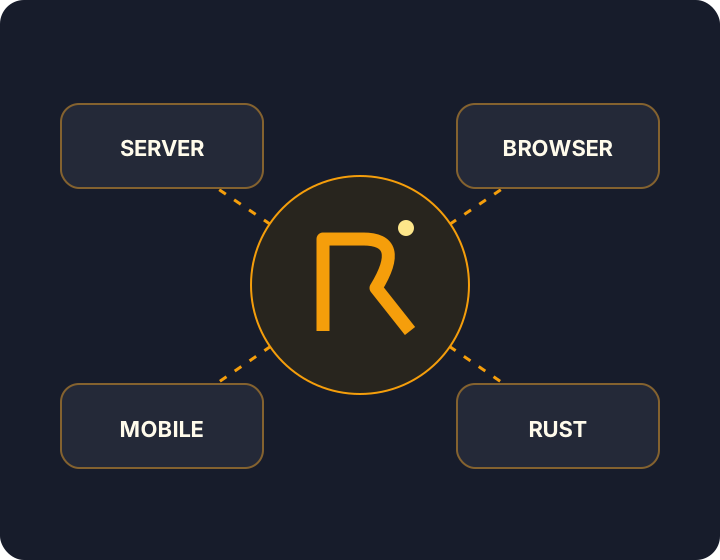
Recached runs one Rust cache engine on the server, in browsers as WebAssembly, inside native Android and Apple apps, and in embedded Rust services. Your backend writes through the RESP command subset with the Redis client it already uses. Clients hold the keys they watch in local memory and receive changes over WebSocket, so a UI can render cached data without a request per read and update when the backend changes it.
Recached is a cache and synchronization engine, not a system of record. Keep MySQL or PostgreSQL as the source of truth and publish committed state into Recached. What Recached is — and isn't draws the line.
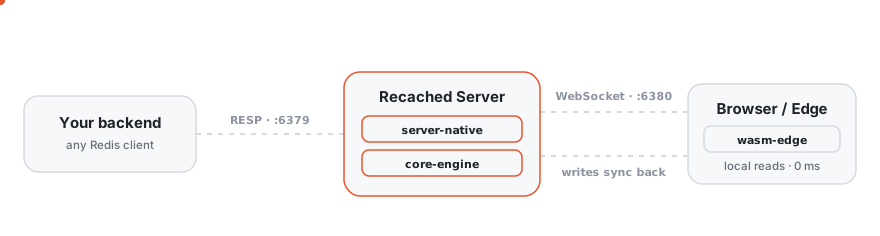
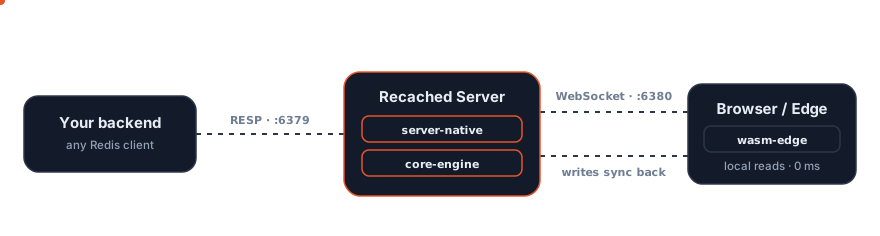
recached-edge runs the engine as WebAssembly, with optional IndexedDB persistence and React and Vue adapters.recached-embed holds a watched slice of the cache in your process's memory.How it works covers hydration, reconnect replay, and each client's storage contract.
Register a live query to receive initial server state and later changes:
import { createCache } from 'recached-edge'

const cache = await createCache({
  connect: { url: 'ws://localhost:6380' },
})
cache.liveQuery('inventory:*')
cache.onKeyChange('inventory:item:99', () => {
  console.log(cache.get('inventory:item:99'))
})
Reads can return a miss before the initial snapshot arrives. On mobile, call watch(pattern) to subscribe, then use Kotlin Flow or Swift AsyncStream to observe local values. How it works covers hydration and reconnect recovery.
Real-time interfaces. A backend INCR on metrics:orders:today reaches every subscribed dashboard without a polling loop or a separate push endpoint. The same path carries shared carts, presence, typing indicators, and reactive UI state.
Offline-capable apps. An Android or iOS field app reopens without a network and still reads the reference data and configuration it last synced from SQLite. Writes queue locally and replay when the connection returns. Browser persistence saves local writes but not every server update; see browser persistence.
Backend services. A Rust service reads feature flags or tenant configuration from local memory on every request. A change made through the server reaches each instance, and a reconnect re-hydrates whatever the instance missed.
Use cases explains each pattern, and where Redis, Memcached, or a database is the better tool.
| Runtime | Package | Status |
|---|---|---|
| Browser, React, Vue | recached-edge, @recached/react, @recached/vue on npm | Sync layer beta |
| Android | dev.recached:recached-android on Maven Central | 0.1.0 preview |
| iOS and macOS | Recached via SwiftPM | 0.1.0 preview |
| Rust service | recached-embed as a Git dependency | Unpublished |
| Server | Docker image, Homebrew, or cargo install --git | Release candidate for cache workloads |
Client support and limits explains API, persistence, and delivery differences. The quick start runs a server and connects a backend and a browser client.
Omit connect in the browser, or omit the URL in a mobile RecachedConfig, to keep data on the client. Browser persistence uses IndexedDB; native SDKs save to SQLite. Cross-device sync needs a server. See local-only use cases and the outbox limits.


